
The basics
Devcon swag is made for each event and never seen again, so every piece proves its owner was there. Swag Station is a production area, and one of the most rewarding places to volunteer.
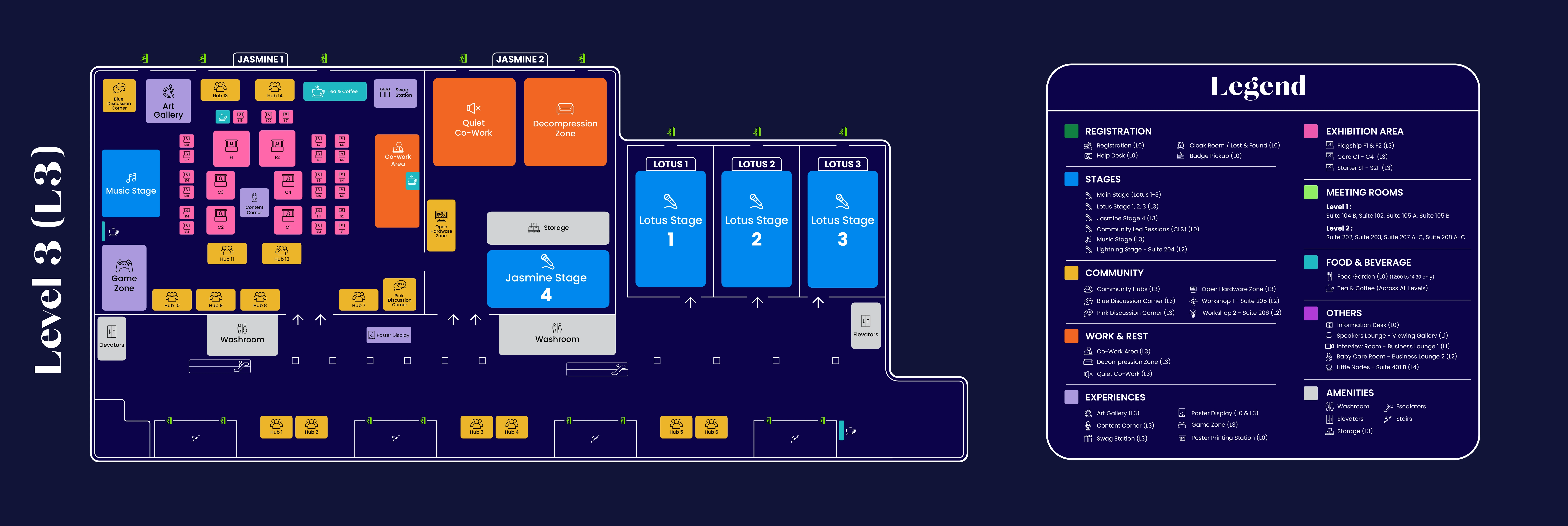
The Swag Station is on Level 3, in Jasmine Hall 1.
Swag Station and General Floor are separate shifts. To keep your shift varied, your volunteer lead can swap you onto General Floor or send you to help your neighbours at the Info Desk. Check in at the Volunteer Check-In desk with the Coordination Support team. The desk is on the right as you enter through Gate 20, Ground Floor (Level 0), and Volunteer HQ is Level 1, Suite 103.
Swag is pre-ordered at ticket checkout. Each attendee's confirmation email has a QR code and the list of items they chose. You scan the code to check what they can claim.
Venue map
Swag Station is on Level 3, the same floor as the exhibition area, the community hubs and the main stages. On the map it is marked in the Experiences colour. Zones can still move before the event.
Your team
Each area has two Volunteer Leads, one for the morning shift and one for the afternoon. Your Volunteer Lead is your first point of contact on shift. Names come from Volunteer Training Session #2 on 16 October 2026 and can change.
| Role | Who |
|---|---|
| Devcon area | Production |
| Devcon workstream leads | Winnie |
| Volunteer lead, AM shift | Pandit, @panditdhamdhere on Telegram |
| Volunteer lead, PM shift | Iñaki, @iberras on Telegram |
Opening hours
| Day | Hours |
|---|---|
| Day 1 | 12:00 PM to 6:00 PM |
| Day 2 | 9:00 AM to 6:00 PM |
| Day 3 | 9:00 AM to 6:00 PM |
| Day 4 (final day) | 9:00 AM to 3:00 PM regular distribution. Closed 3:30 to 5:00 PM for the Closing Ceremony. Reopens 5:00 to 6:00 PM for size exchanges and last-chance claims, subject to stock. |
Scanning a claim
Your scanning device should already be logged in and ready. Tell your Lead if you need help. The device checks that an attendee is eligible to claim each item.
- Greet themSay:
Hi! What items did you order?
- Scan the QR codePress the orange button on the side of the device. The laser comes from the top of the device.
- Read the colourGreen means go. Yellow means the item was already claimed. Red means they are showing the wrong ticket.
- Hand over the swagCheck the size where it applies. Put all their items inside one tote bag.
Swag items
Four items are on the list. The attendee's confirmation email shows which ones they chose at checkout.
- Gamcha (scarf), for all tickets.
- T-shirt, for all tickets, in sizes S, M, L, XL and 2XL.
- Chess board, for all tickets.
- Customized tea, for exhibitors and speakers only.
Tote bags
Tote bags are limited and go first come, first served to attendees collecting swag. Each attendee gets one tote bag only, however many items they collect.
Speaker and exhibitor line
For a speaker ticket, check whether they claimed the "Magical Ether Tea". If not, ask if they would like it. It is a special item for speakers and exhibitors.
Size change requests
Size changes are not allowed during distribution. All items were pre-ordered from the sizes attendees chose at checkout, quantities are limited, and stock is allocated to those orders.
If someone asks, explain this kindly. They can check back on the last event day, 6 November, at 5:00 PM to see whether spare stock is available. Exchanges depend on availability and are not guaranteed.
Your station
- Display area. Each station has a shelf backdrop for sample items. Keep it neat, organised and fully stocked.
- Station storage. The area behind the white partition is where you unpack, organise and prepare swag for quick handing out.
- Devcon Storage Area. Extra cartons that do not fit are kept in Jasmine Hall 2.
Setup day, 2 November
Check in at 2:00 PM at your station. Count and organise every item against the inventory list, set aside the spare stock and label it, put sample items on the shelves, and sort the rest by item and size.
Each event day, 3 to 6 November
- Before opening. Arrange and tidy the display shelves, check stock, refill what is low and make sure the scanning devices are ready.
- During the day. Keep the shelves clean and stocked, scan every QR code, give attendees only what they can claim, and tell your Lead when an item is running low.
- End of day. Count and organise what is left. If the station needs more stock, fetch it from the Devcon Storage Area in Jasmine Hall 2. The Volunteer Lead updates the daily stock report with the total items distributed and the total left unclaimed, and makes sure the stock records are accurate before leaving.
Questions you will get
"Can I change my size?"
Not during distribution. They can check on 6 November at 5:00 PM for spare stock, but it is not guaranteed.
Lost and found
Attendees will ask where to report a lost item or see what has been handed in. Send them to the Devcon Lost & Found app, where they can browse found items, report a lost one and see how to claim it with the item's reference number.
If someone hands you a found item, take it straight to the cloakroom desk, so it is logged with a photo and stored safely.
Plan your commute with the shift planning table, check what to carry, and save the emergency numbers.