
The basics
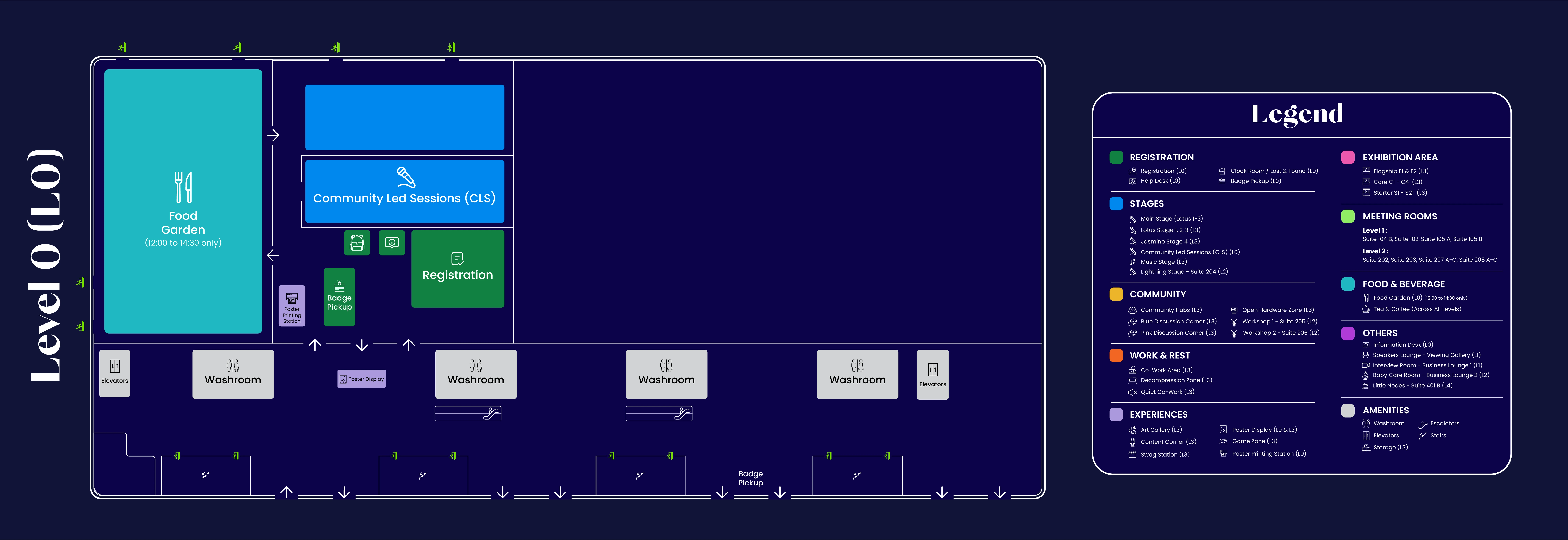
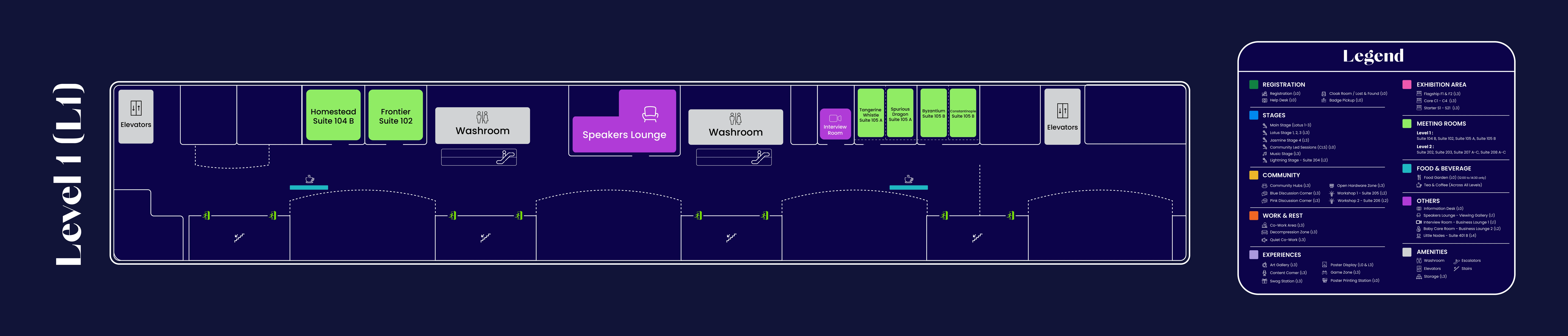
The Stage area covers technical setup, microphones and show running, meaning the slides and cues that bring each speaker on and keep every session on time. The Devcon team has a technical lead for AV, a show-running lead and a programming lead, listed under Your team. Check in at the Volunteer Check-In desk with the Coordination Support team. The desk is on the right as you enter through Gate 20, Ground Floor (Level 0), and Volunteer HQ is Level 1, Suite 103.
The stages
| Programme | Space | Volunteers |
|---|---|---|
| Devcon programming, 5 stages | Lotus 1 | 3 (1 with the Stage Manager, 1 organising seats, 1 crowd control) |
| Lotus 2 | 3 | |
| Lotus 3 | 3 | |
| Jasmine Stage 4 | 3 | |
| Lightning Stage | 2 | |
| Devcon programming, 2 workshop rooms | Workshop 1 | 2 |
| Workshop 2 | 2 | |
| Community Led Sessions (CLS), 1 stage | Community Led Stage. Day 1 Defi 101, Day 2 ETHIndia, Day 3 Open Tech Summit, Day 4 Career Fair | 4 (2 registration and access control, 1 AV, 1 networking) |
The Opening Ceremony is in the Lotus stage, with Lotus 1, 2 and 3 merged together. The full schedule is in the Devcon app.
Venue map
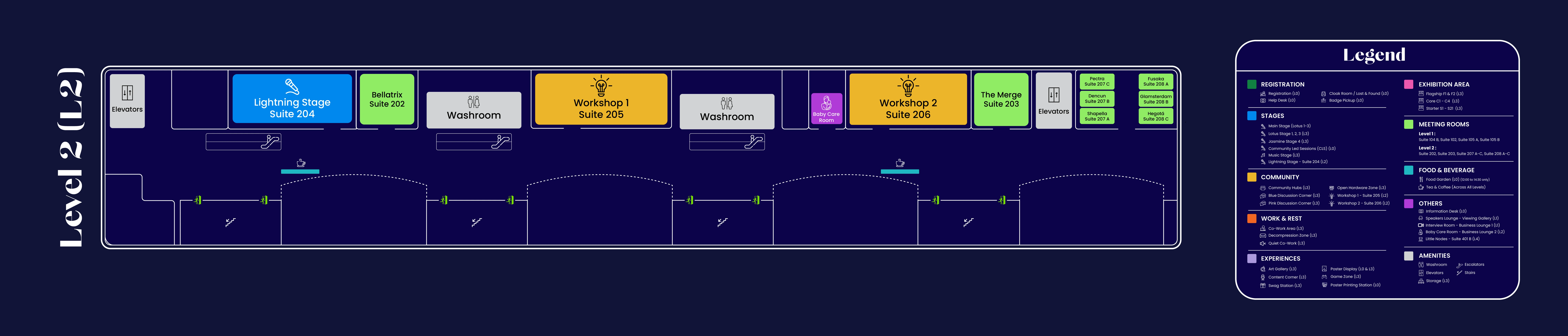
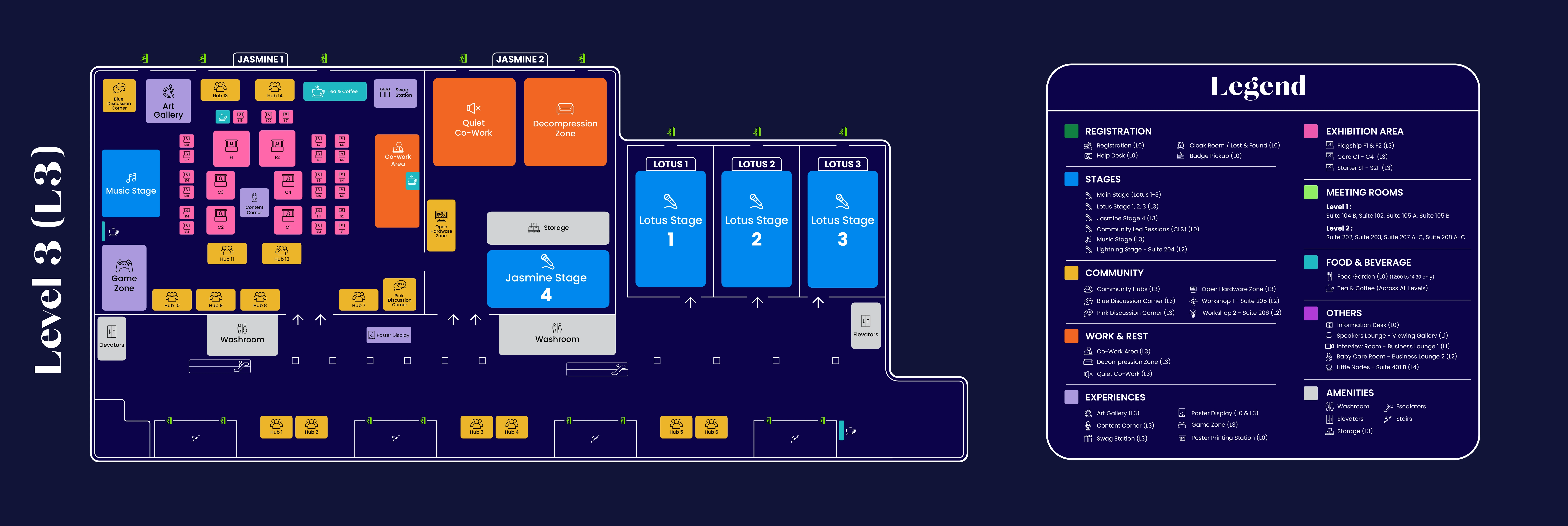
The stages are spread over the floors: Community Led Sessions on Level 0, the Lightning Stage in Suite 204 on Level 2, and the Lotus Stages 1 to 3, Jasmine Stage 4 and the Music Stage on Level 3. Level 1 has no stage. Zones can still move before the event.
Your team
Each area has two Volunteer Leads, one for the morning shift and one for the afternoon. Your Volunteer Lead is your first point of contact on shift. Names come from Volunteer Training Session #2 on 16 October 2026 and can change.
| Role | Who |
|---|---|
| Devcon area | AV and Programming |
| Devcon workstream leads | James (technical lead, AV), Carla (show running), Ceci (programming) |
| Volunteer lead, AM shift | Vanshika, @Vanshika0x on Telegram |
| Volunteer lead, PM shift | Valeria, @x0valeria on Telegram |
| MC lead | Ross, @Ross_Stephenson on Telegram |
| AV and content questions | Carlota, @carlota_vv on Telegram |
| Community Led Stage production questions | Calvin, @thisiscalvin on Telegram |
Your duties in the room
Assisting attendees
- Answer questions, for example when a talk starts or stops.
- Tell attendees when a room is at full capacity.
- Ask people not to block the room entrance.
- Make sure people do not talk during the session.
- Help people find seats. Encourage them to fill in and not skip seats, so everyone has one.
Supporting the MC
- Pass the microphone around when a talk ends and it is Q&A time.
Assisting speakers
- Fetch water if a speaker needs it.
- Add or remove chairs when asked.
- Lend a hand moving stage furniture between a talk and a panel.
- If a speaker is not at the stage 20 minutes before their session, help get them from the Speakers Lounge (signed as "Viewing Gallery"), in coordination with the Speaker Manager.
- If a speaker loses track of time and is somewhere in the venue, the Speaker Manager may ask you to help find them. They will share a photo of the speaker.
Tell your Volunteer Lead if any issue comes up, for example if a room reaches capacity.
Speaker information
Speakers receive everything through Pretalx, where they submitted their session and profile. They can update it until the conference. The speaker guidelines have the rest.
Day 1 on the stages, Tuesday 3 November
From the Devcon app schedule, which is in Early Access and can change. Times are IST. The app is the source of truth for rooms and session times.
| Stage | Day 1 highlights |
|---|---|
| Community Led Stage | DeFi 101 panels from 13:15: Securing Ethereum in the age of AI, State of Web3 Security (14:15), Wallet Security (15:15) and Decentralized Coordination and Responsible Disclosure (16:15) |
| Jasmine Stage 4 | Community Hubs opening at 12:10, then a 20 to 25 minute slot for each hub until 17:40 |
| Music Stage | Live music from 11:50 (folk, rock, house, vocal) and the Open Source Orchestra open jam from 15:00 to 18:00 |
| Workshop 1 and Workshop 2 | BuidlGuidl in Workshop 1 and hub workshops in Workshop 2, from 12:10 |
Lost and found
Attendees will ask where to report a lost item or see what has been handed in. Send them to the Devcon Lost & Found app, where they can browse found items, report a lost one and see how to claim it with the item's reference number.
If someone hands you a found item, take it straight to the cloakroom desk, so it is logged with a photo and stored safely.
Plan your commute with the shift planning table, check what to carry, and save the emergency numbers.