
Your job
Check in at the Volunteer Check-In desk with the Coordination Support team. The desk is on the right as you enter through Gate 20, Ground Floor (Level 0), and Volunteer HQ is Level 1, Suite 103. Then stay in your general floor area for the whole shift. You can rotate between General Floor posts, or stay on one if you prefer.
Main activities
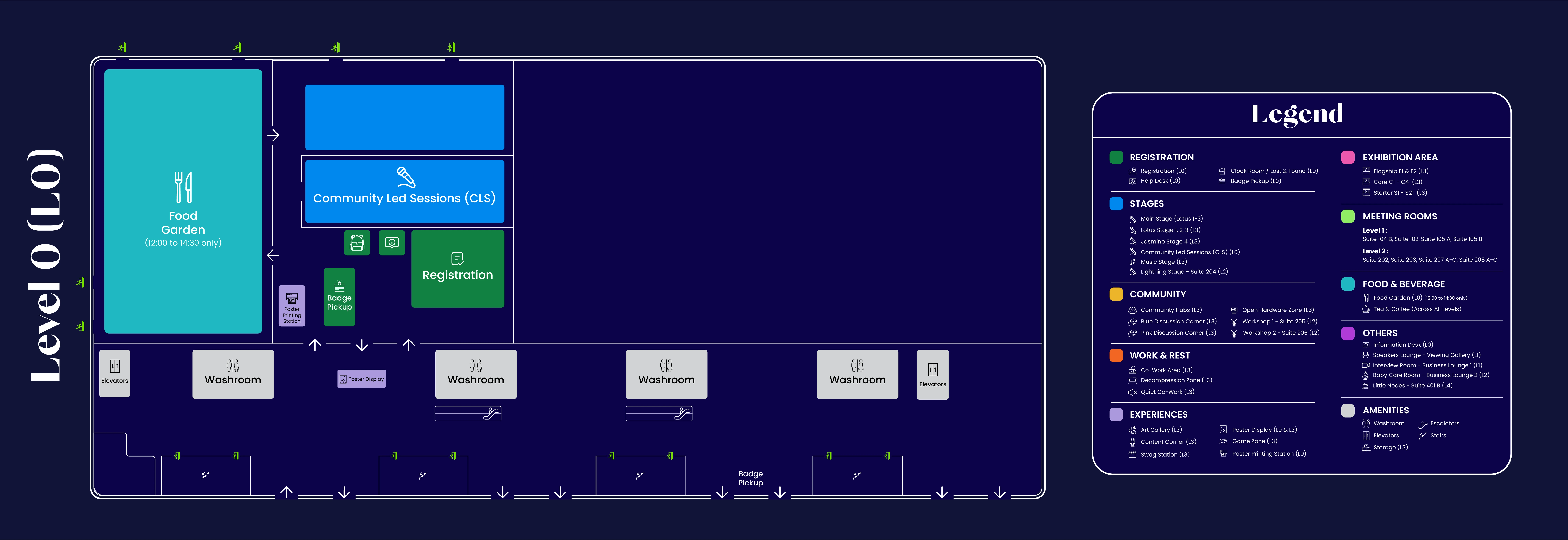
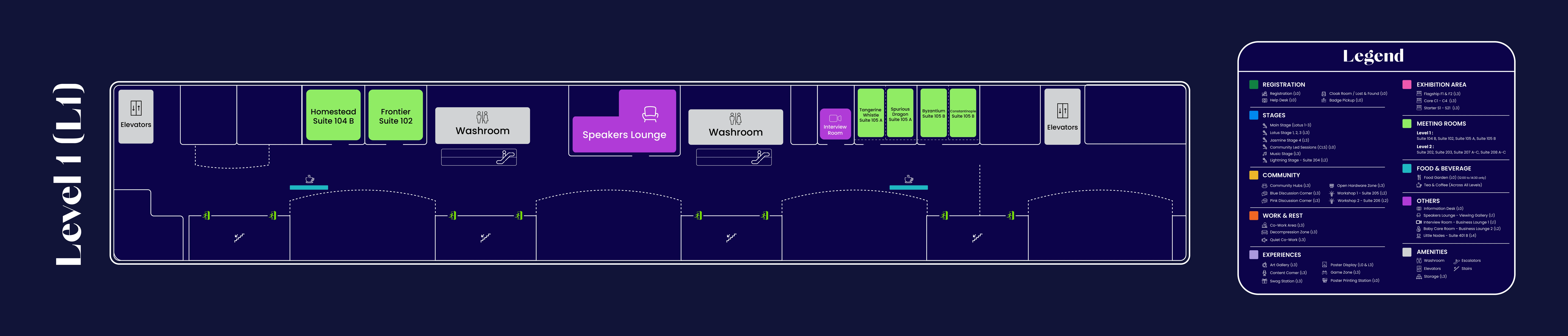
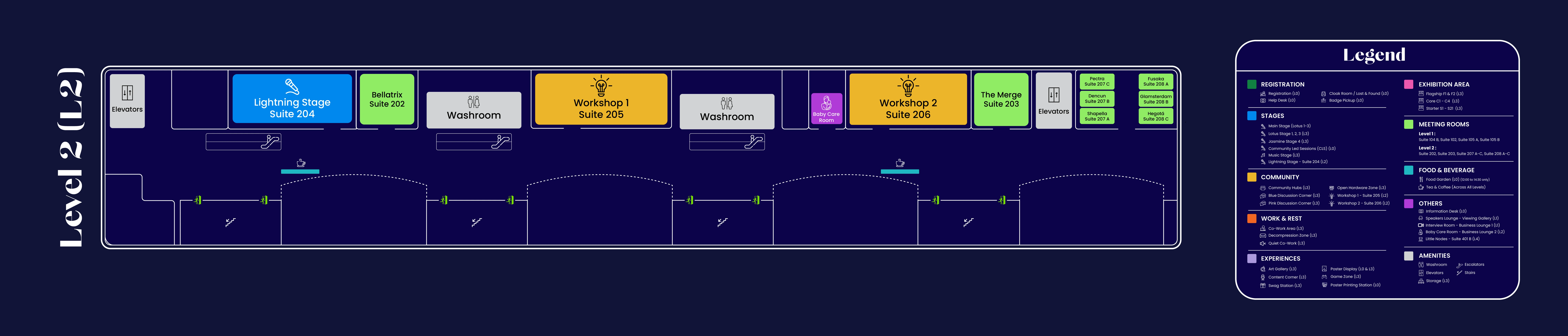
- Assist attendees with directions and finding rooms. The venue map is in the Devcon app and is displayed throughout the venue. Study it and be ready to direct attendees with confidence.
- Assist with general Devcon questions. Study the schedule and the Devcon app.
- Remain in the General Floor area assigned to you for the whole shift.
- Make sure everyone has a Devcon wristband. If someone does not, approach them and kindly ask them to keep their wristband visible at all times. If they still do not show one, find a security guard and let them know.
- Watch for unapproved vendors, giveaways, solicitation and suspicious behaviour. Escalate immediately by sharing a photo in the General Floor and Runners chat.
- If you find things, banners, posters or stickers on walls, on tables, in crevices, at food locations or in bathrooms, remove them.
- Answer attendee questions about food restrictions and the food on offer at lunch and for snacks.
- The Food Garden is on Level 0, Ground Floor, through the main entrance at registration and in towards the left. It is open from 12:00 noon to 2:30pm.
- Food and Beverage stations with drinks and snacks are spread through the venue all day. Know where they are and what they offer, so you can direct attendees to them.
If you see anyone in the venue without a wristband, ask them why.
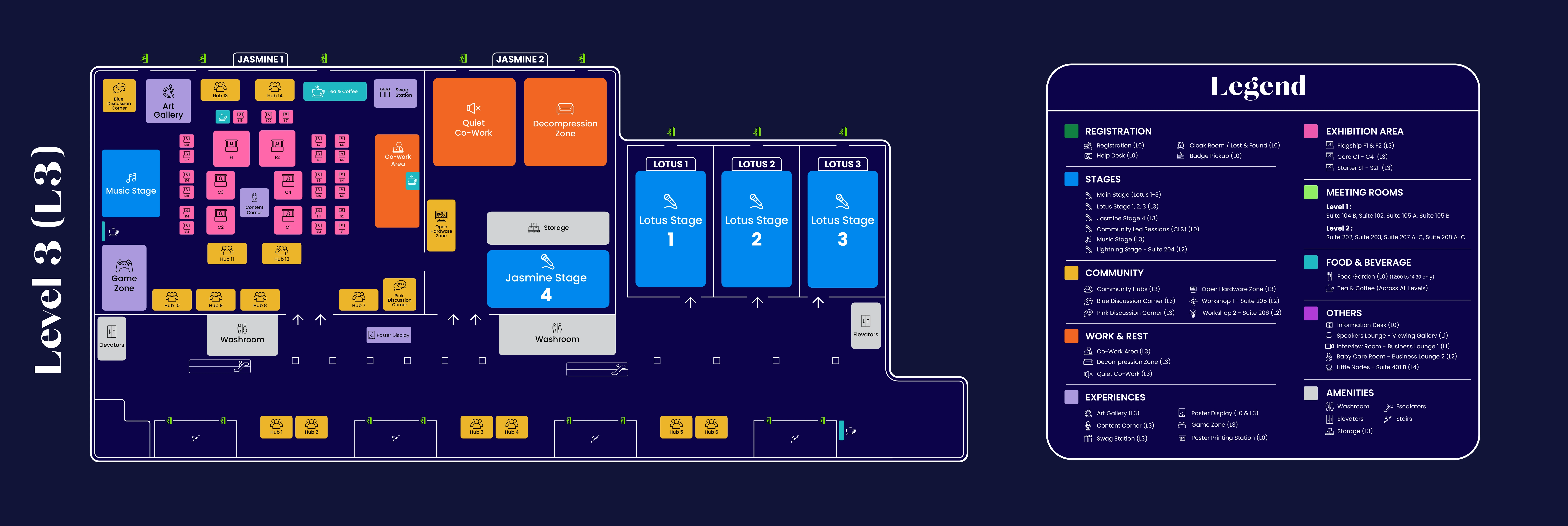
Venue map
Your posts span all four levels, so learn every floor before your first shift. The all-levels map comes first, then each level on its own so you can zoom in. Every level has washrooms, elevators and escalators. Zones can still move before the event.
Your team
Each area has two Volunteer Leads, one for the morning shift and one for the afternoon. Your Volunteer Lead is your first point of contact on shift. Names come from Volunteer Training Session #2 on 16 October 2026 and can change.
| Role | Who |
|---|---|
| Devcon area | Production |
| Devcon workstream leads | Natalia, Winnie, Calvin. Natalia leads the magician runners. |
| Volunteer lead, AM shift | Rahul, @Rahulsah2005 on Telegram |
| Volunteer lead, PM shift | Atanu, @darksaii on Telegram |
Placement
Your Volunteer Leads, Rahul and Atanu, make sure every area is staffed and review all areas.
| Area | Volunteers |
|---|---|
| Ground Floor | 4 |
| Level 1 | 2 |
| Level 2 | 2 |
| Level 3 | 8 |
| Runners | 2 |
| Magician Runners, Production | 2 |
| Magician Runners, AV | 1 |
| Additional support | TBD |
Magician Runners are a specialised group ready to run as fast as you can. They work closely with Production on backstage matters and know the venue like the palm of their hand.
Badge and Sticker Station runner
A quick check-in role. Swing by every 30 minutes to keep the station running smoothly. You do not need to stay there full time. Sync with the Registration team so the area always has enough supplies.
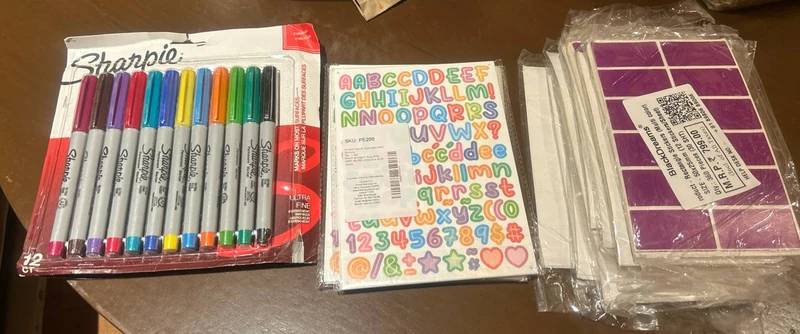
- Check the sticker and marker supply, and restock from the backup stash if it is running low.
- Confirm the badge printer or label maker, if in use, still has paper or tape and is working.
- Tidy the table: straighten stickers, recap pens, clear trash.
- Flag any bigger issue, such as out-of-stock items or equipment problems, to the Magician Runners group or your point of contact.
- Make sure the signage is still visible and in place.
Important notes
- Stay in constant contact with the stage volunteers so that lost speakers are spotted and sent the right way at once.
- Besides Supporters, nobody sets up booths or promotional banners in the venue. The aim is to keep the event sponsor neutral.
- If anyone hands out swag of any kind, such as t-shirts, stickers or pins, flag it immediately. Only pre-approved teams may distribute swag, under the code of conduct.
- Fill rooms in order. People tend to leave two empty seats between groups, which blocks the people at the back. Ask them to sit together, and tell your lead if a room is over capacity, since that counts as an incident.
- Photograph any flyer, QR code or giveaway that has not been approved by the Devcon team and send it to your lead or the general floor group. You will get a quick yes or no on whether it stays.
- If the main stage is full for the opening or closing ceremony, send people to the stages where it is streamed.
- CHECK FOR WRISTBANDS!
Lost and found
Attendees will ask where to report a lost item or see what has been handed in. Send them to the Devcon Lost & Found app, where they can browse found items, report a lost one and see how to claim it with the item's reference number.
If someone hands you a found item, take it straight to the cloakroom desk, so it is logged with a photo and stored safely.
Still to confirm
Nothing here is guessed. These items stay marked until the Devcon team confirms them.
- Where each placement sits within its floor.
- How speakers and EF staff are identified.
Plan your commute with the shift planning table, check what to carry, and save the emergency numbers.